
How to Search Cases by Name
Find the right court before you type a name. Felony, civil, and family cases live in district court. Those files sit with the Live Oak County District Clerk. Probate, guardianship, and constitutional County Court files start with the County Clerk instead. Every JP precinct and each municipal court keeps its own lower-court records. Search a name in the wrong system and you may get nothing back. That can happen even when a public case exists.
- Identify the issuing or filing court from the citation, notice, pleading, or other source document.
- Open the appropriate official portal. Use re:SearchTX for participating district or county electronic records, or the court-specific municipal route.
- Enter a last name first, then add a first name, case style, date range, county, or court only as needed.
- Compare the court, case type, filing date, and case style before opening a result. Do not select a row from the name alone.
- Record the cause number and verify material details with the custodian when the result affects a hearing or record request.
| Search Field | Use | Format Note |
|---|---|---|
| Name or case style | Broad discovery | Try fewer words, initials, or a spelling variant. |
| Cause number | Best exact match | Keep prefixes, suffixes, spaces, and punctuation. |
| Court and county | Venue filter | Select Live Oak and the court type when offered. |
| Date range | Limit results | Allow for filing, transfer, and disposition dates. |
Live Oak County Case Custody
No single clerk in Live Oak County holds every case. The District Clerk keeps District Court files covering felony, civil, family, juvenile, and child-protection matters. Its county page notes that the office also serves the 2nd Multicounty Court at Law. The County Clerk carries constitutional County Court records, county criminal cases, probate, and guardianships. Four JP precincts operate here. The municipal courts of George West and Three Rivers each maintain their own files.
That split shapes every case lookup. A probate search belongs with the County Clerk, not the county's real-property PublicSearch portal. A traffic citation should go to the court or precinct printed on the ticket itself. Federal cases sit in PACER. They fall under the Southern District of Texas Corpus Christi Division, outside any Live Oak County case search.
Start with venue: court name → record custodian → matching official search or contact channel.
How to Search by Case Number
A cause number is the identifier a court stamps on a case. Copy every character exactly as the source displays it. Live Oak County uses no single format across its court levels. An invented district pattern would only mislead you. George West does publish a citation format for its municipal search. Keep a space after the uppercase city prefix, as in GW 12345. Remember, a citation number may not equal a district cause number.
On re:SearchTX, start with the full cause number when you have it. On the state citations-and-notices tool, pick General Search when you know the cause number or court name. If nothing matches, drop any extra date filter and try again, then call the clerk. Never strip a meaningful prefix just to force a hit. Write down both the number and its court. An identifier without a venue will not carry a dependable Live Oak County case lookup very far.
Live Oak County re:SearchTX Cases
re:SearchTX is the state's electronic court-records environment. Its official quick reference covers Cases, Filings, Text, and Hearings modes, along with filters, case details, filing details, export, saved searches, and advanced search. You may need registration or eFileTexas credentials to get in. Fields and document access can also vary by user role.
The official portal shows a public entry and sign-in surface, which opens the statewide route. That route does not promise every Live Oak County document or case type is there.
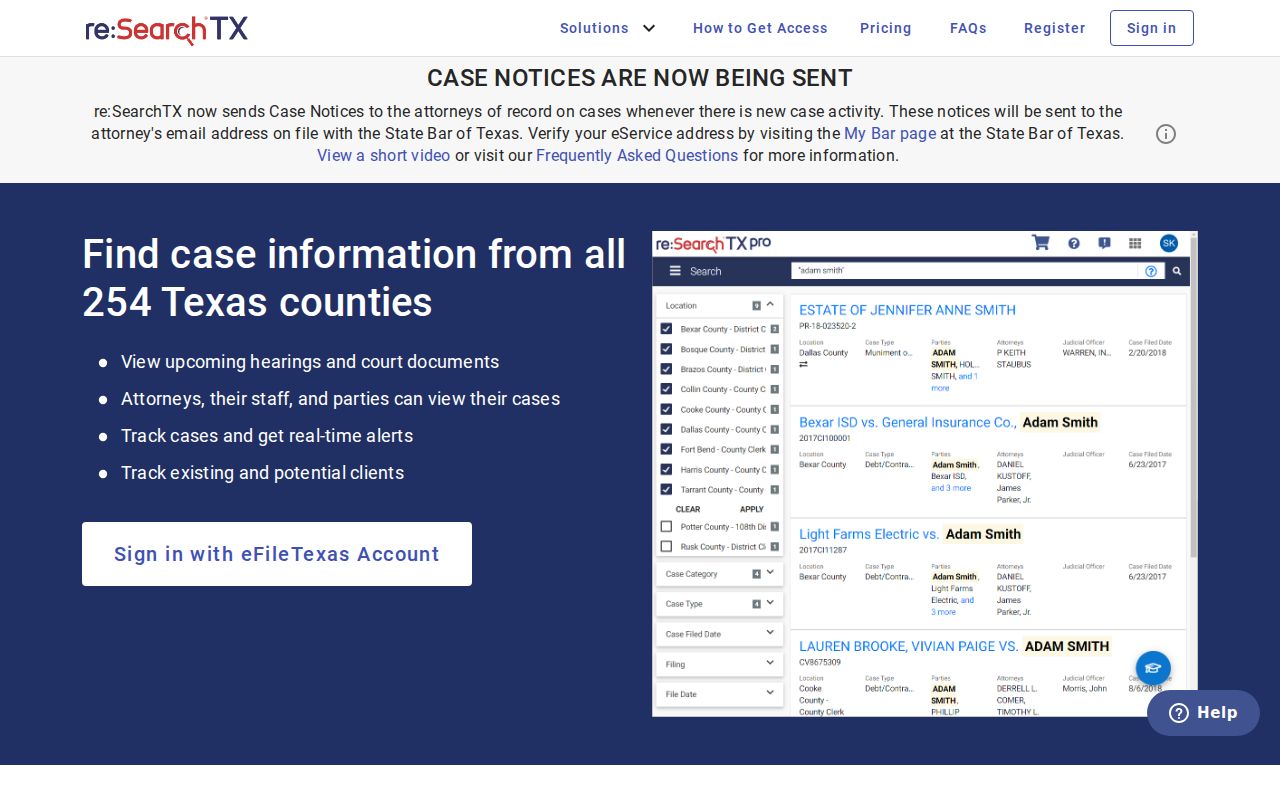
The Texas Judicial Council reported the system went operational in late 2018 with a large document collection, while noting a criminal-record limit inside that collection figure. A 2024 state direction gave district and county clerks until November 1, 2025 to integrate their local systems. Check current Live Oak coverage and access each time you search.
What a Case Search Shows
A search result is a lead, not the whole case file. Before trusting a similar name, read the court and case type on the entry. A docket can list events, filings, settings, orders, and disposition data. A specific pleading or exhibit may take separate access. How much detail you see depends on the court and your role.
| Cause Number | The court’s identifier; preserve its displayed punctuation and suffix. |
|---|---|
| Case Style | The caption or description used to identify the matter. |
| Court | The court that owns the case and points to the proper clerk. |
| Filed Date | The date the matter entered that system, not necessarily the event date. |
| Status | Pending, inactive, disposed, or another system label requiring context. |
| Hearings and Filings | Events and documents shown for that case, subject to access limits. |
Live Oak County Citation Search
The Texas citations and notices search does one narrow job. Its fields cover name or general text, cause number, court or county, and status. A result shows the name, cause number, court or county, status, and an action. The tool supports a wildcard suffix. It suggests starting with few words before refining.
The state's own page lays out those citation and notice fields. Use it to find a published citation or notice. It is not for browsing the full Live Oak County court docket.
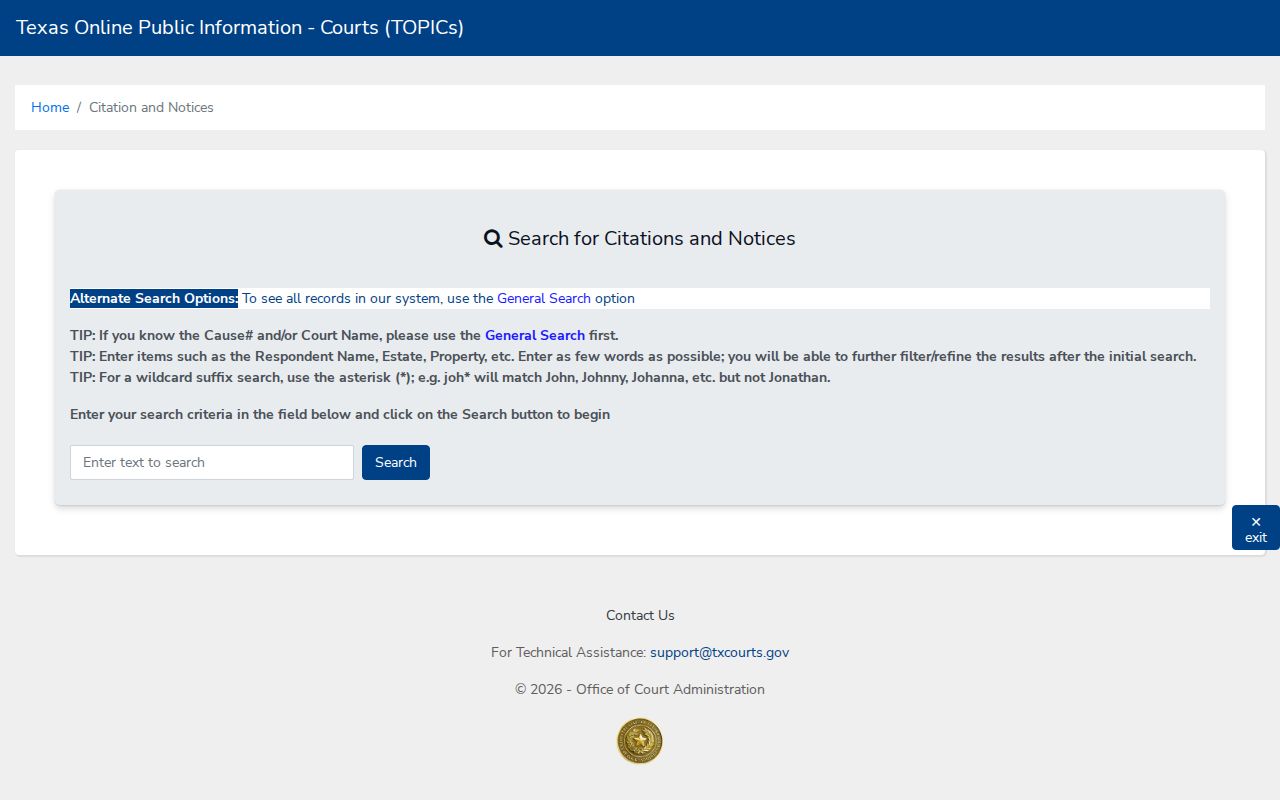
A matching notice can hand you a cause number and court for the next search. It does not mean every pleading, setting, or the current disposition will be visible there.
County vs Statewide Case Search
Neither route replaces the other. re:SearchTX can help locate participating electronic district and county records across Texas. Local clerks still keep the files, offering a counter, a phone line, a public terminal where documented, and a copy-request process. The District Clerk sends divorce researchers to an in-office public terminal and tells anyone who cannot visit to call.
| Statewide re:SearchTX | Live Oak Custodian |
|---|---|
| Searches participating electronic cases, filings, text, and hearings. | Identifies the official file and current local access method. |
| May require an account and provide role-based access. | Offers clerk contact, counter access, and a documented divorce terminal. |
| Useful when venue is uncertain or a case spans counties. | Best for a known Live Oak court, cause number, copy, or certification. |
| Does not guarantee every criminal record or document. | Applies sealing, redaction, and court-specific restrictions. |
When Live Oak County Case Results Are Missing
An empty results screen proves very little on its own. A Live Oak County docket search can come up blank because the case sits in a different court, the date range was too tight, the matter moved to another county, or a name was spelled differently than the filing. Electronic entries also lag behind paper filings, and some case files are simply restricted from public view. So treat a missing result as a prompt to look elsewhere, not as the final word on whether a case exists.
- Read the source document again and confirm the issuing court and county.
- Search the exact cause or citation number and remove an unnecessary date filter.
- Try a shorter name or case style, then apply the correct court filter.
- Call the District Clerk, County Clerk, JP precinct, or municipal clerk and ask about the correct index.
- Request inspection or a copy when the record is public but not electronically displayed.
The District Clerk can settle most questions directly. Call 361-449-2733 ext. 2, or go to Room 202 at 301 Houston Street in George West. Docket and copy questions also go to DCOFFICE@loctx.org. Use these channels to sort out access to court records, not to hand in a filing.
Live Oak County Case Filing
eFileTexas handles submissions for the whole state. Parties and their attorneys use it to file and serve documents. It is not a public docket database, though. A confirmation there proves only that something was submitted. The clerk may still reject it. The clerk may keep it out of public view, or the court may not have ruled at all.
Local payment tools work the same way. George West's Tyler portal searches citations several ways, including by citation number and date of birth. It exists for municipal citation and payment work. Three Rivers posts an nCourt payment form rather than a browsable docket. Enter only what the transaction needs. Never republish a date of birth, Social Security number, or similar sensitive detail.
Note: A receipt or payment balance is not a full Live Oak County case record.
Restricted Cases and Access Rules
Not every Live Oak County court record is open. Juvenile files stay closed, and so do expunctions, sealed matters, and confidential filings. Redactions are common too. The clerk may black out identification numbers, financial-account details, birth dates, home addresses, or a minor's name. That step happens before releasing a document. One caution: a document that is missing from a docket is not necessarily sealed. Only the clerk or the system can assign that status.
Texas Judicial Branch access guidance is worth reading before you file a records request. Rule 12 governs judicial records. Asking a court for a docket is not the same as a standard executive-branch Public Information Act request. Your request should name the court, the cause number, the record you want, and a date range. It should also give the copy type. Keep this in mind. The clerk does not have to build a new report just to answer a question.
Sometimes electronic access ends at the docket index. Ask the clerk's office about inspection on site. Ask about a regular or certified copy, fees, redaction, and how the record will be delivered. Restricted access calls for a lawful basis and the court's own procedure. A broader name search will not get you around it.